Fixing the controls in GNM Head Studio
I shipped GNM Head Studio, a browser sculptor and ComfyUI node built on Google's GNM head model, with a panel of friendly sliders: jaw width, smile, cheek fullness. One of the GNM developers left a comment saying the labels were mine, not the model's, and that most of them didn't match what was actually happening to the head.
They were right. This post covers what was wrong and what I rebuilt.
The labels were invented
My sliders came from a community mapping that gave names to GNM's principal components. The model itself is blunt about what they are. The identity components are literally named head_000 through head_252 in the released weights. They are PCA directions, ordered by variance, and each one moves several correlated things at once. A sign flip can make the positive direction feel like the label, but that doesn't make component 4 into "jaw width". It's identity direction 4, which moves the jaw along with everything that co-varies with it.
I checked whether some components might really be localized. They aren't. The most eye-concentrated identity mode puts about 6% of its motion in the eye region. Google's own demo notebook exposes the same controls as "the first ten components of the linear identity model", plain numbered sliders. The authors don't name them.
The model ships its own interface
The fix wasn't removing the sliders. It was noticing that the real control surface was in the weights file the whole time:
- Twenty anatomical vertex groups: forehead, brows, temples, orbitals, zygomatics, cheeks, parotids, nose, lips, chin. The dev's own Blender tool masks these during randomization. Randomize a region, freeze the rest.
- Two small VAE samplers that generate identity vectors from gender and ethnicity labels, and expression vectors from named categories like happy, snarl, and tongue-out. That's where the semantics live, not in the PCA axes.
I rebuilt both tools around that. The browser app now mixes identities per region through feathered masks built from those twenty groups. You can keep a face and re-roll just the nose, or graft one person's mouth onto another.
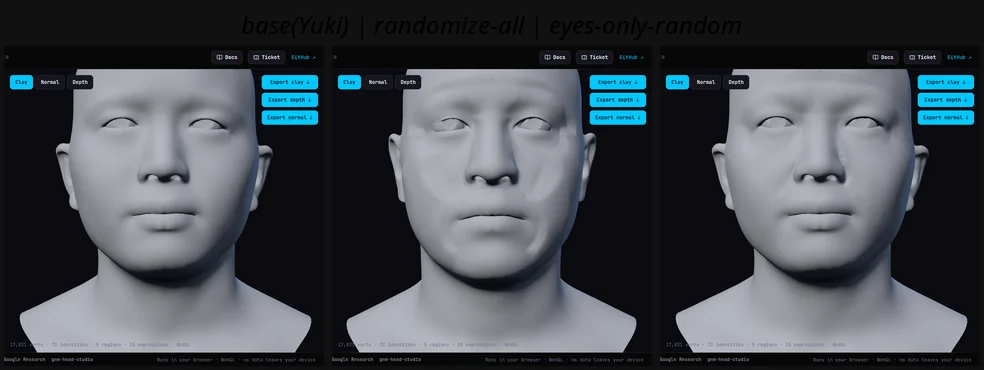
The workflow the dev's Blender tool uses, in the browser: base face · randomize everything · randomize only the eye region with the rest frozen.
The expression dropdown is now the sampler's real categories. The old sliders are still there, demoted to an "Advanced" section with numbered labels, presented the same way Google presents them.
The ComfyUI node got the same schema, with one advantage over the browser: it runs the full model live, so region mixing goes through the complete pose pipeline, correctives included.
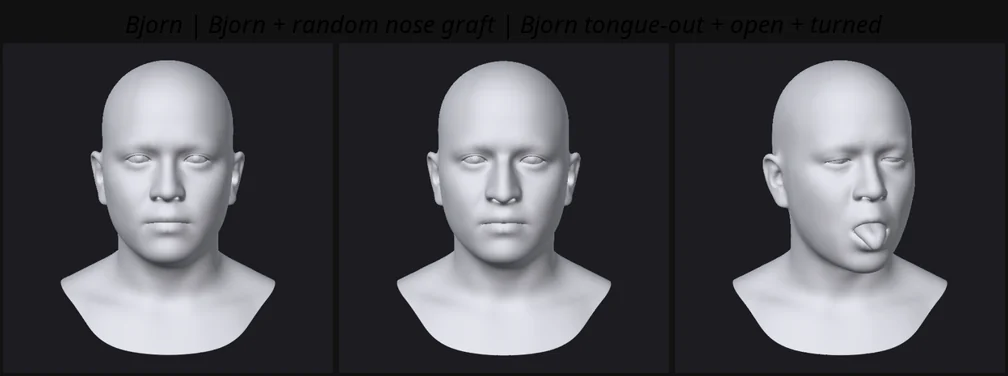
Same controls through the full model in ComfyUI: Bjorn · Bjorn with a random nose graft (only the nose changes) · semantic tongue-out with mouth open and head turned.
Problems along the way
Seams. The vertex groups are near-binary, so mixing two faces across a region boundary cracked the surface. Feathering the masks with Laplacian smoothing over the mesh graph fixed it, but too much smoothing diluted the thin regions to nothing (the temples are 62 vertices a side). The final recipe is mild smoothing plus a re-sharpening exponent, with temples folded into the forehead bucket. Twice I fixed this and the cracks were still on screen, and both times the browser was serving a stale cached mask file. Version your binary fetches.
The region view. My first visualizations colored vertex patches and looked like face paint. The dev's screenshots show a clean mesh with the region boundaries drawn as dark lines that follow the topology. Those lines turn out to be the boundaries of the twenty vertex groups, and the clean look comes from the quad structure. I baked the quad wireframe (26k edges) and the boundary loops (the 854 edges where the two adjacent quads disagree about their region) and draw both over a Blender-blue head. It matches their tool because it's the same data.
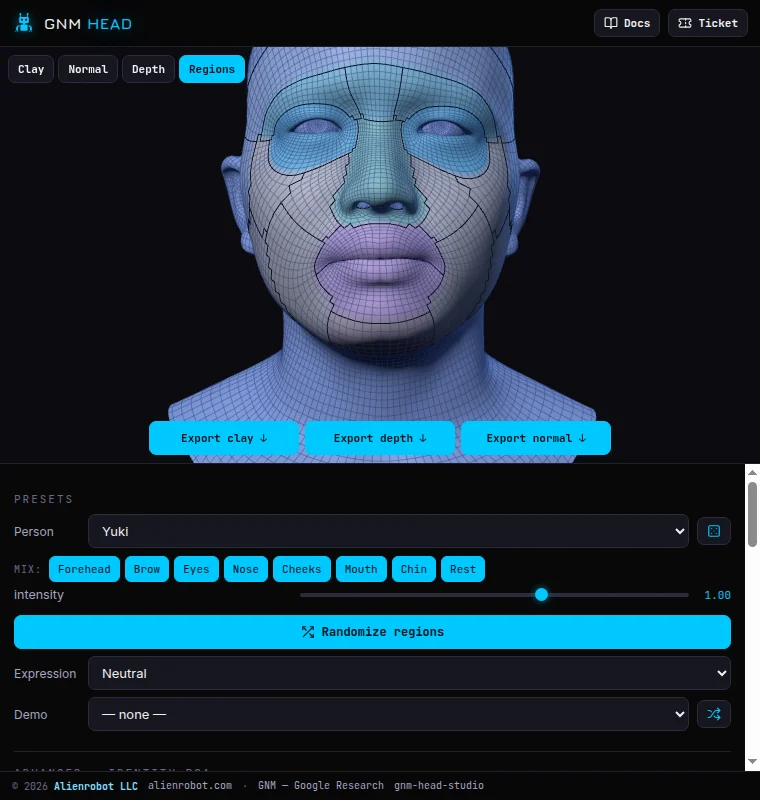
The Regions view: 26k-edge quad wireframe, 854 boundary-loop segments from the model's own vertex groups, a subtle tint per mixable bucket.
Anatomy. An earlier version deleted the teeth and tongue because my hand-tuned smile combos drove them through the lips. With real sampled expressions the anatomy behaves, so the full mesh is back: teeth, gums, tongue, and eyes colored from the model's material groups (scleras, irises, pupils). I went looking for official texture maps and found the repo ships none. The white-sclera look in the demos is those vertex groups.
Tongue. The stick-out-the-tongue control in the demo GIF isn't a slider. It's the semantic TONGUE_CENTER class. I sampled eight candidates from the VAE, kept the one with the most forward tongue displacement, and baked it as a preset. The raw tongue components only move the tongue around inside the mouth, which is the whole PCA-versus-semantics problem in miniature.
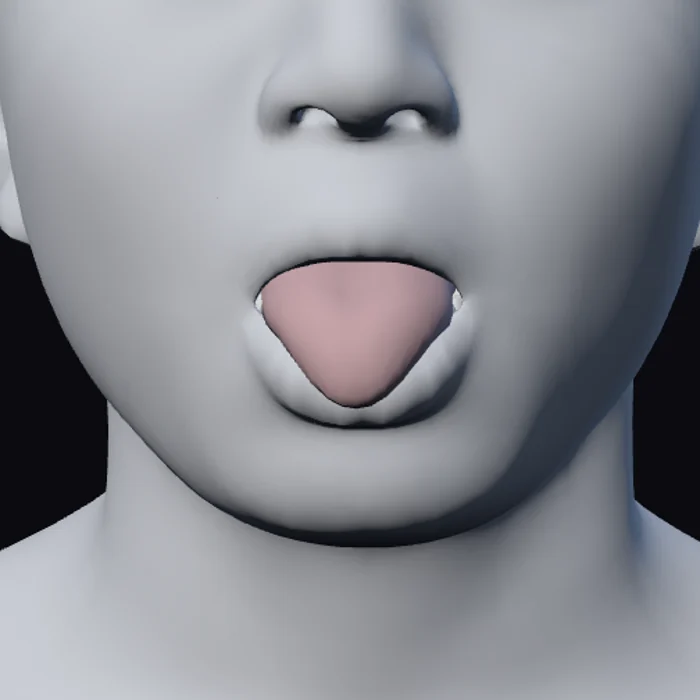
The semantic class does what no single component can: lips part, jaw drops, tongue protrudes.
Pose from photo (beta)
The rebuild ended with a feature I'd been circling for a while. Drop a photo onto the app and the head matches it. MediaPipe's face landmarker runs in the browser, in WASM, so the photo never leaves your device. The head pose comes from its transformation matrix, and a handful of blendshape scores map onto GNM's expression components: mouth open, eyes wide or shut, squint, smile.
I calibrated it with a loop instead of eyeballing: render our own head at a known pose, feed the render back in as the photo, compare the recovered angles. Target 25 / -12 / 10 degrees, recovered 23 / -10 / 9, after two sign flips that the loop caught immediately. It's labeled beta in the UI because it estimates a few parameters as a starting point. It is not a capture.
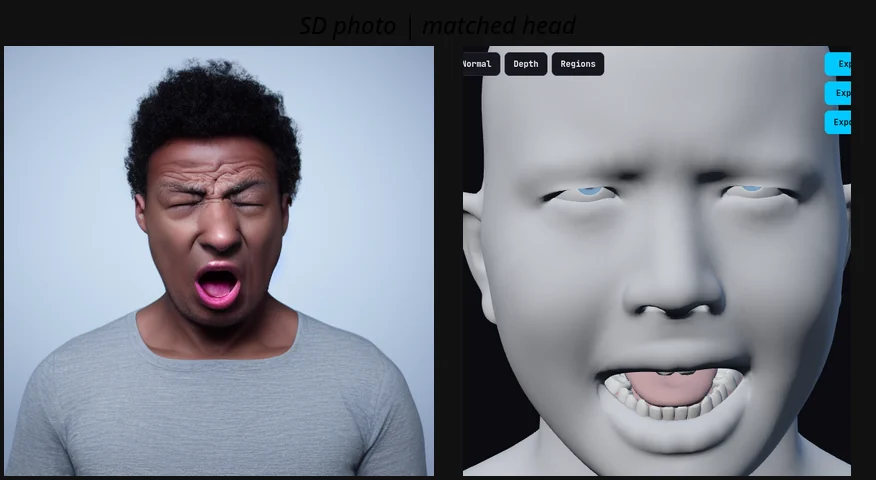
I generated a test photo expecting wide-eyed shock and got a yell with the eyes squeezed shut. The transfer got it right anyway: mouth maxed, eyes closed, head tipped back, no phantom smile.
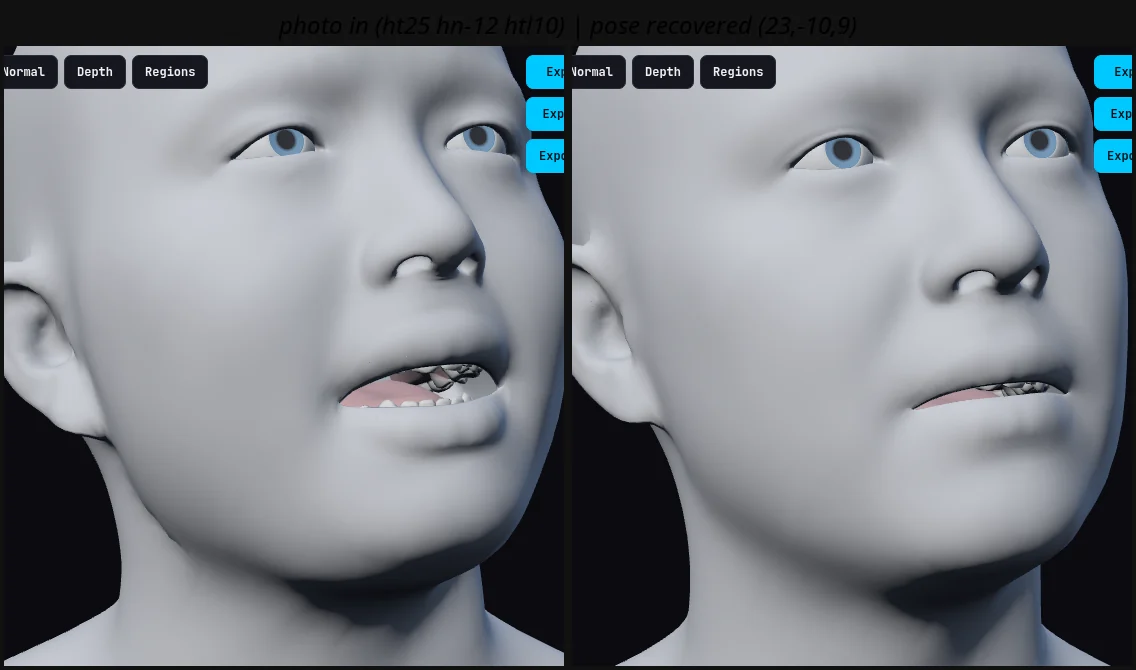
The calibration loop: render at a known pose (25 / -12 / 10), re-ingest, compare (23 / -10 / 9).
What I'm keeping from this
A PCA direction is not a feature, and naming components after features is fiction. Google numbers them, and now I do too.
The released model is the documentation. The vertex groups, the samplers, and the landmark correspondences were all in the .npz before I went looking.
Blunt feedback from someone who built the thing is worth more than a week of my own guessing. The docs now credit the nudge.
And every fix here got verified by rendering and looking, or by round-tripping through the system. Assuming the code did what I meant is how the fake labels happened in the first place.