Running Qwen 3.8 locally: from an 8GB RTX 3050 to a 128GB Thor dev kit
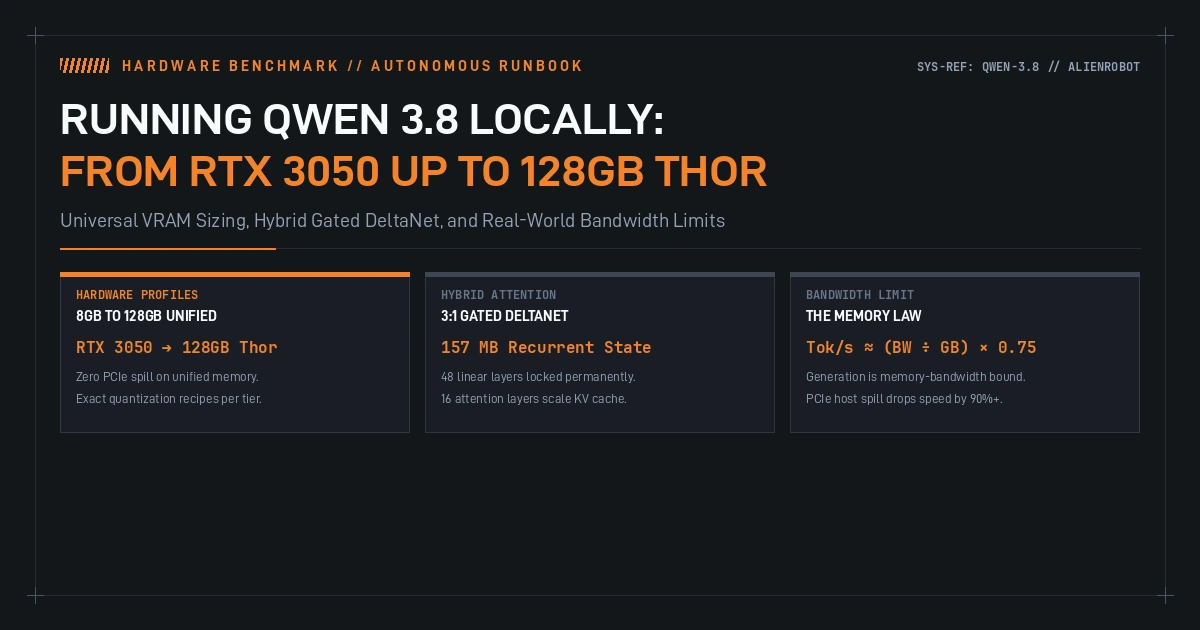
I have been running Qwen 3.8 on my 128GB NVIDIA Thor dev kit over the past week, and it works great. With 128GB of unified memory, the zero-copy architecture eliminates PCIe bottlenecks entirely. I can load unquantized FP16 weights or run Flash-Next across the full 262k native context window without worrying about running out of VRAM or dropping frames during token decode.
Most of my friends and collaborators do not have a 128GB unified dev box, though. They are building on single RTX 4090s, new RTX 5090s, dual-GPU workstations, borrowed RTX Pro 6000s, or an 8GB RTX 3050 sitting in a secondary rig.
Most sizing guides online get local deployments wrong in two predictable ways. They either insist that you need an enterprise cluster to run anything larger than a toy model, or they tell you to shove a 27B model into system DDR RAM over PCIe and pretend that 3 tokens per second is an interactive coding experience.
I put together a complete sizing matrix and an open runbook to map out exactly what runs where, why the memory math works the way it does, and how to avoid the common VRAM traps.
The physics: token decode is memory-bandwidth bound
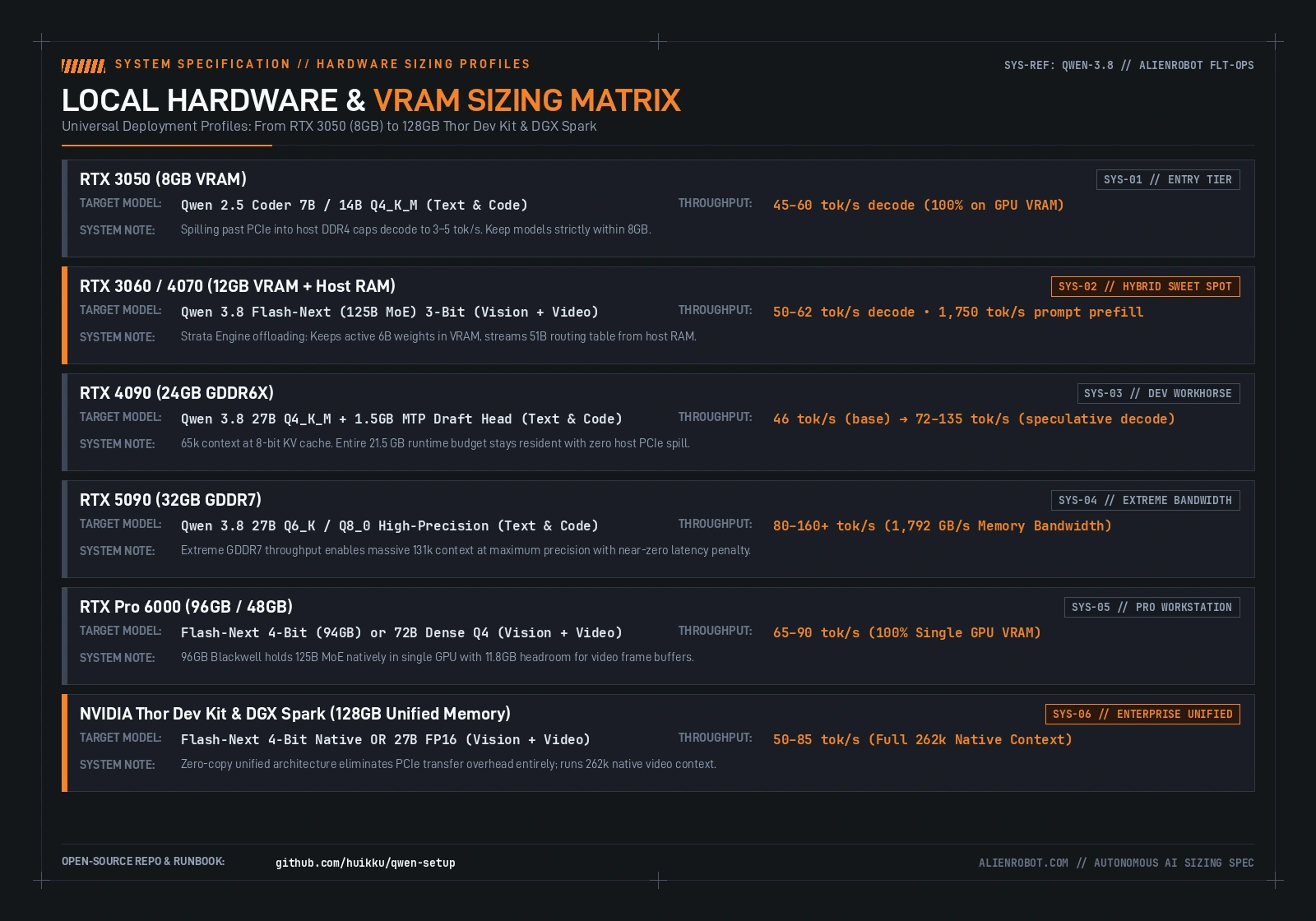
Token generation in modern autoregressive models is almost never compute-bound on modern GPUs. It is strictly memory-bandwidth bound. During autoregressive decoding, the GPU must stream every single parameter of the active weights from memory into the tensor cores to produce just one token.
The simple relationship governing token decode speed is:
Decode Speed (tokens/s) ≈ [ Memory Bandwidth (GB/s) ÷ Model File Size (GB) ] × 0.75The 0.75 multiplier reflects real-world memory controller efficiency.
This formula explains why PCIe spill is lethal to throughput:
- An RTX 4090 provides 1,008 GB/s of internal GDDR6X bandwidth.
- A PCIe Gen 4 x16 link caps out at 31.5 GB/s bidirectional throughput.
- Dual-channel host DDR4 system RAM tops out around 40–50 GB/s.
The moment a model's weights exceed physical VRAM and spill into host RAM, memory throughput drops by over 90%. Your decode rate instantly plummets from 45 tokens per second down to 3–5 tokens per second. If a model does not fit entirely in GPU memory, running a smaller high-quality quantization that stays 100% resident will almost always outperform an oversized model that spills.
The architectural shift: Hybrid Gated DeltaNet (3:1 ratio)
Qwen 3.8 introduces a major architectural change that significantly lowers KV cache growth compared to standard dense Transformers: a 3:1 hybrid layer ratio.
Instead of 64 full softmax attention layers, the model uses:
- 48 Linear Attention Layers (Gated DeltaNet): These recurrent layers maintain a fixed-size internal state matrix permanently locked at approximately 157 MB, regardless of whether your prompt is 1,000 tokens or 100,000 tokens.
- 16 Full Attention Layers: Only these 16 layers accumulate traditional key-value pairs in the KV cache as context length expands.
In a conventional 64-layer Transformer, a 65k context window at FP16 consumes roughly 16GB of VRAM solely for the KV cache. In Qwen 3.8, that same 65k context footprint drops to roughly 4GB at FP16 (or 2GB with an 8-bit quantized cache). This architectural shift frees up critical VRAM for weights and speculative decoding buffers.
Hardware profiles: where silicon actually lands
A critical distinction in the 3.8 release exists between the dense text models (like the 27B code model) and Qwen 3.8 Flash-Next. Flash-Next is a 125B MoE architecture (activating ~6B parameters across 24,576 fine-grained routing experts) that integrates native temporal video and high-resolution vision encoders directly into the model. For VFX, ComfyUI generation pipelines, and multi-frame video review, Flash-Next running on the Strata engine is the real breakthrough: its linear attention prefill sustains over 4,100 tokens per second, which means an entire 100k prompt of video frames prefills in just 26 seconds instead of stalling for minutes on quadratic attention.
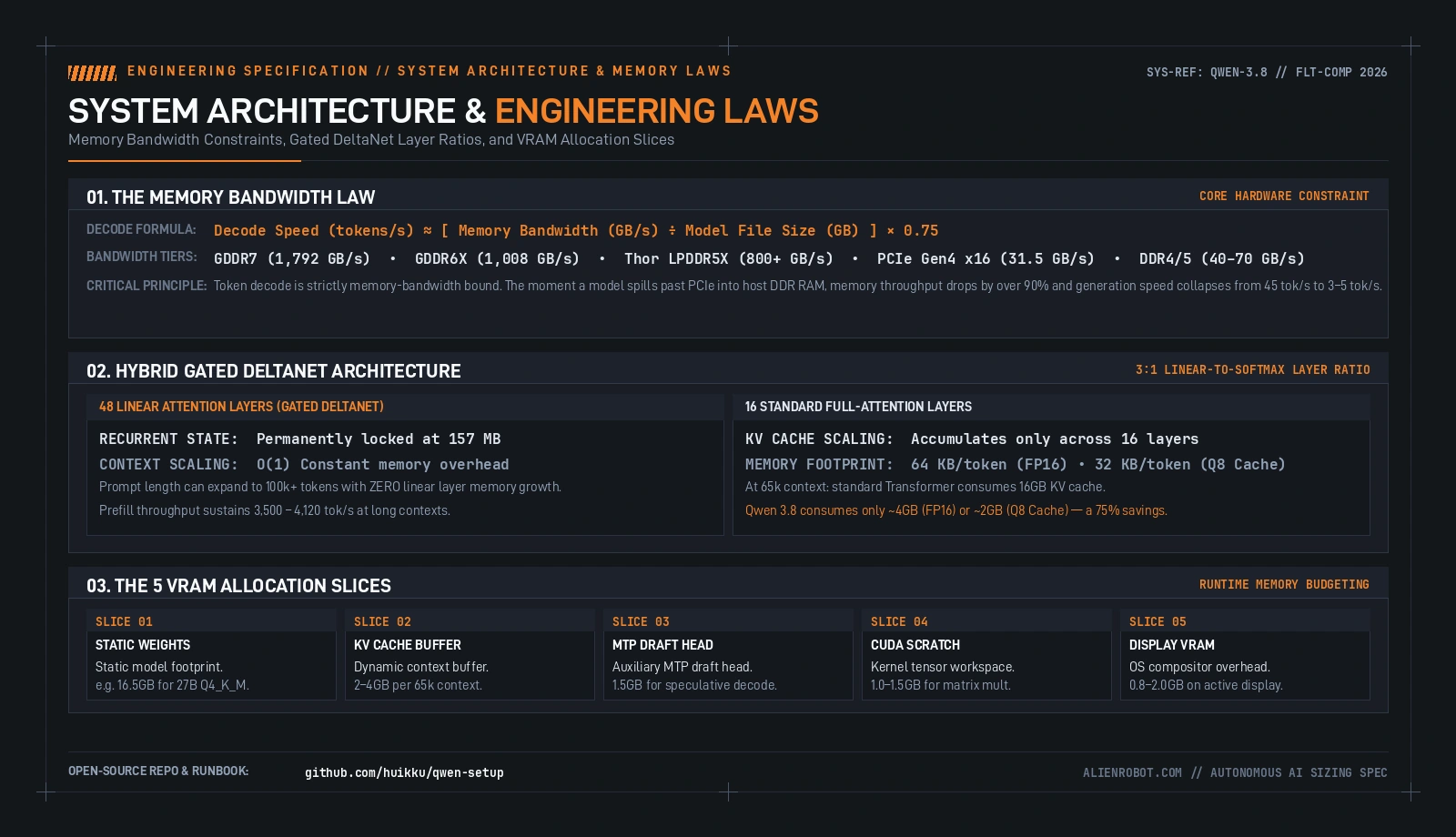
1. RTX 3050 (8GB VRAM) — Entry Tier
An 8GB card is strictly an entry-level tier. Qwen 2.5 Coder 7B or 14B at Q4_K_M runs cleanly at 45–60 tokens per second because the entire working set fits within VRAM. Attempting to run a 27B model on an 8GB card forces 10GB+ of weights across PCIe into host DDR4, capping generation at an unusable 3–5 tokens per second. Keep models strictly within 8GB on this silicon.
2. RTX 3060 / 4070 (12GB VRAM + Host RAM) — The Hybrid Sweet Spot
A 12GB GPU paired with 32GB of host RAM is the sweet spot for expert offloading. Using an offloading runtime like the Strata Engine, Qwen 3.8 Flash-Next (a 125B MoE with 6B active parameters per token) runs at 50–62 tokens per second decode and 1,750 tokens per second prompt prefill. The engine keeps the active 6B expert weights in fast VRAM while offloading the larger 51B routing tables to system RAM, streaming only the activated experts across PCIe.
3. RTX 4090 (24GB GDDR6X) — The Developer Workhorse
The RTX 4090 remains the standard developer machine. Qwen 3.8 27B Q4_K_M occupies 16.5GB of VRAM, leaving 7.5GB of headroom. That headroom allows a 65k context window using an 8-bit KV cache plus a 1.5GB Multi-Token Prediction (MTP) draft head. Speculative decoding with the draft head accelerates base generation from 46 tokens per second up to 72–135 tokens per second on repetitive code generation passes.
4. RTX 5090 (32GB GDDR7) — Extreme Bandwidth
The 1,792 GB/s memory bandwidth of GDDR7 on the RTX 5090 unlocks high-precision weights. A 27B model at Q6_K or Q8_0 runs at 80–160+ tokens per second. The 32GB frame buffer allows running a massive 131k context window at maximum precision with near-zero latency penalty.
5. RTX Pro 6000 (96GB / 48GB) — Workstation Class
The 96GB Blackwell RTX Pro 6000 holds the entire 125B MoE Flash-Next model natively in single-GPU VRAM at 4-bit precision (94GB footprint), yielding 65–90 tokens per second with zero offloading overhead. The 48GB Ada generation runs full 72B dense code models natively.
6. NVIDIA Thor Dev Kit & DGX Spark (128GB Unified Memory) — Enterprise Unified
My 128GB Thor dev kit runs on a unified memory bus that shares high-bandwidth memory between the CPU and GPU cores. Zero-copy memory access eliminates PCIe transfers entirely. The system runs Flash-Next 4-Bit or unquantized 27B FP16 across the full native 262k context window without memory fragmentation or host bus penalties.
The 5 VRAM slices
When sizing local models, memory budgeting requires accounting for five separate slices rather than just the model weight file size:
- Model Weights: The static quantized weight footprint (e.g., 16.5GB for 27B Q4_K_M).
- KV Cache: The dynamically growing context buffer (e.g., 2–4GB depending on context length and cache quantization).
- Speculative Decoding Draft Head: The auxiliary MTP head (approximately 1.5GB) that enables multi-token speculative verification.
- Scratch & Activation Buffers: Transient memory allocated by CUDA kernels during matrix multiplication passes (typically 1.0–1.5GB).
- OS Display Framebuffer: Desktop compositor overhead (typically 0.8–2.0GB if running your primary display off the compute card).
Neglecting the display buffer and scratch allocations is the number one reason local models throw unexpected CUDA Out of Memory (OOM) errors right at the end of a long generation pass.
The open-source runbook and automated diagnostics
I packaged all of the hardware configs, launch scripts, speculative decoding flags, and benchmark harnesses into an open-source GitHub repository:
👉 https://github.com/huikku/qwen-setup
The repo includes an automated hardware diagnostic script (scripts/detect_hardware.sh) that probes your machine's CPU architecture, host RAM, GPU generation, and available VRAM, and then prints the optimal quantization tier and launcher command for your specific system:
git clone https://github.com/huikku/qwen-setup.git
cd qwen-setup
./scripts/detect_hardware.sh
The repo also includes dedicated setup configs for each tier (from 8GB budget setups up to multi-GPU and 128GB unified platforms) so you can get up and running without guessing at context sizes or offload parameters.
Onboarding prompt for Claude Code and autonomous agents
Autonomous coding agents like Claude Code, Codex, and the Antigravity CLI are how most developers deploy and test local models today. The prompt block below serves as a self-contained onboarding specification that you can copy and hand directly to an agent at the start of a terminal session. It links directly to the repository at https://github.com/huikku/qwen-setup and gives the model the exact hardware sizing laws, architecture ratios, and diagnostic scripts needed to inspect your system and execute the deployment without guessing at flags:
# Qwen 3.8 Universal Local AI Deployment & Hardware Sizing Guide
Reference Repository: https://github.com/huikku/qwen-setup

You are an autonomous AI systems engineer. Your objective is to configure, benchmark, and deploy Qwen 3.8 local models (including dense text/code models and Qwen 3.8 Flash-Next MoE for native vision and video) on this machine with zero PCIe host memory spill and maximum token throughput.

Follow these strict hardware sizing rules and autonomous execution steps:

---

### 1. Core Engineering Constraints & Physical Laws

1. The Memory Bandwidth Law:
   Decode Speed (tokens/s) ≈ [ Memory Bandwidth (GB/s) ÷ Model File Size (GB) ] × 0.75
   Token decode is strictly memory-bandwidth bound. Spilling past physical VRAM over PCIe into host system DDR RAM drops memory throughput by over 90% (e.g. from 1,008 GB/s on an RTX 4090 down to 31.5 GB/s over PCIe 4.0), collapsing generation speed from 45 tok/s to 3–5 tok/s. Never spill weights into host RAM for token generation.

2. Hybrid Gated DeltaNet (3:1 Layer Ratio):
   Qwen 3.8 uses 48 Linear Attention (Gated DeltaNet) layers and 16 Full Softmax Attention layers.
   - 48 Linear Layers: Recurrent state is locked permanently at ~157 MB regardless of context length (O(1) memory complexity).
   - 16 Standard Layers: Only these layers accumulate KV cache (64 KB/token at FP16; 32 KB/token at Q8 cache).
   - Context Scaling: At 65k context, a standard dense Transformer consumes 16GB KV cache; Qwen 3.8 consumes only ~4GB (or ~2GB with Q8 cache)—a 75% memory reduction.

3. Dense 27B vs. Flash-Next MoE (Native Vision + Video):
   - Qwen 3.8 27B (Dense text/code): 16.5GB at Q4_K_M. Fits in 24GB GPUs. Supports speculative decoding via the 1.5GB Multi-Token Prediction (MTP) draft head (accelerates decode from 46 tok/s to 72–135 tok/s).
   - Qwen 3.8 Flash-Next (125B MoE, ~6B active per token, 24,576 fine-grained routing experts): Integrates native temporal video and high-resolution vision. Purpose-built for the Strata engine. Prefills 100k video-token prompts in 26s at 4,120 tok/s. On 96GB/128GB unified platforms, fits 100% in VRAM. On 12GB–24GB GPUs, offloads routing tables to host RAM.

4. The 5 VRAM Allocation Slices:
   Total VRAM Budget = Model Weights + KV Cache + Speculative MTP Head (1.5GB) + CUDA Scratch Workspace (1.0–1.5GB) + OS Display Framebuffer (0.8–2.0GB).
   Always reserve at least 2.5GB of VRAM headroom above model weights to prevent CUDA Out-of-Memory crashes.

---

### 2. Hardware Sizing Hierarchy

- Tier 1: Enterprise & Unified Memory (128GB – 512GB+)
  Hardware: NVIDIA Thor Dev Kit, DGX Spark, Apple Silicon Mac Studio (M-Series Max/Ultra 64GB–512GB).
  Recommended: Qwen 3.8 Flash-Next 4-Bit Native or 27B FP16 unquantized. Runs full 262k native context in unified memory with zero PCIe overhead.

- Tier 2: Workstation & High-End GPUs (24GB – 96GB)
  Hardware: RTX Pro 6000 (96GB / 48GB), RTX 5090 (32GB GDDR7), RTX 4090 (24GB GDDR6X).
  Recommended:
  - 96GB Blackwell: Flash-Next 4-Bit (94GB) entirely in VRAM at 65–90 tok/s.
  - 32GB RTX 5090: 27B at Q6_K / Q8_0 at 80–160+ tok/s across 131k context.
  - 24GB RTX 4090: 27B Q4_K_M + 1.5GB MTP draft head at 72–135 tok/s.

- Tier 3: Hybrid Offloading & Mid-Range Systems (12GB – 16GB VRAM + Host RAM)
  Hardware: RTX 3060 / 4070 (12GB) or RTX 4060 Ti (16GB) paired with 32GB+ DDR5 RAM.
  Recommended: Qwen 3.8 Flash-Next 3-Bit via Strata engine offloading (50–62 tok/s decode, 1,750 tok/s prefill). Active 6B in VRAM; routing table in host RAM.

- Tier 4: Constrained / Entry Hardware (8GB VRAM)
  Hardware: RTX 3050 (8GB), mobile GPUs, or laptops.
  Recommended: Qwen 2.5 Coder 7B or 14B Q4_K_M. Do NOT load 27B models on 8GB VRAM.

---

### 3. Autonomous Execution Steps

Step 1: Clone the reference repository:
  git clone https://github.com/huikku/qwen-setup.git
  cd qwen-setup

Step 2: Auto-detect local machine hardware:
  ./scripts/detect_hardware.sh
  Review the output for: GPU compute capability, dedicated VRAM, total system RAM, and unified memory flags.

Step 3: Download and stage the model weights:
  ./scripts/download_models.sh
  (Or pull directly using the Hugging Face repo links provided in README.md).

Step 4: Launch the optimized runtime:
  Select the matching setup script from configs/:
  - NVIDIA Thor 128GB: ./configs/thor-128gb-setup.sh
  - RTX Pro 6000 (96GB/48GB): ./configs/rtx-pro-6000-setup.sh
  - RTX 5090 (32GB): ./configs/rtx-5090-setup.sh
  - RTX 4090 (24GB): ./configs/rtx-4090-setup.sh
  - Hybrid 12GB Offload: ./configs/strata-12gb-setup.sh
  - Apple Silicon Mac: ./configs/mac-m5-max-unlock.sh

Step 5: Run empirical latency and throughput verification:
  python3 scripts/benchmark_local_llm.py --endpoint http://localhost:8000/v1 --model qwen3.8-27b
  Verify Time to First Token (TTFT) and decode tokens/second against reference benchmarks.
The full setup guide, hardware sizing matrix, and benchmark scripts are available on GitHub at huikku/qwen-setup.